A multi-chart crypto workspace
with unlimited charts and unlimited tabs
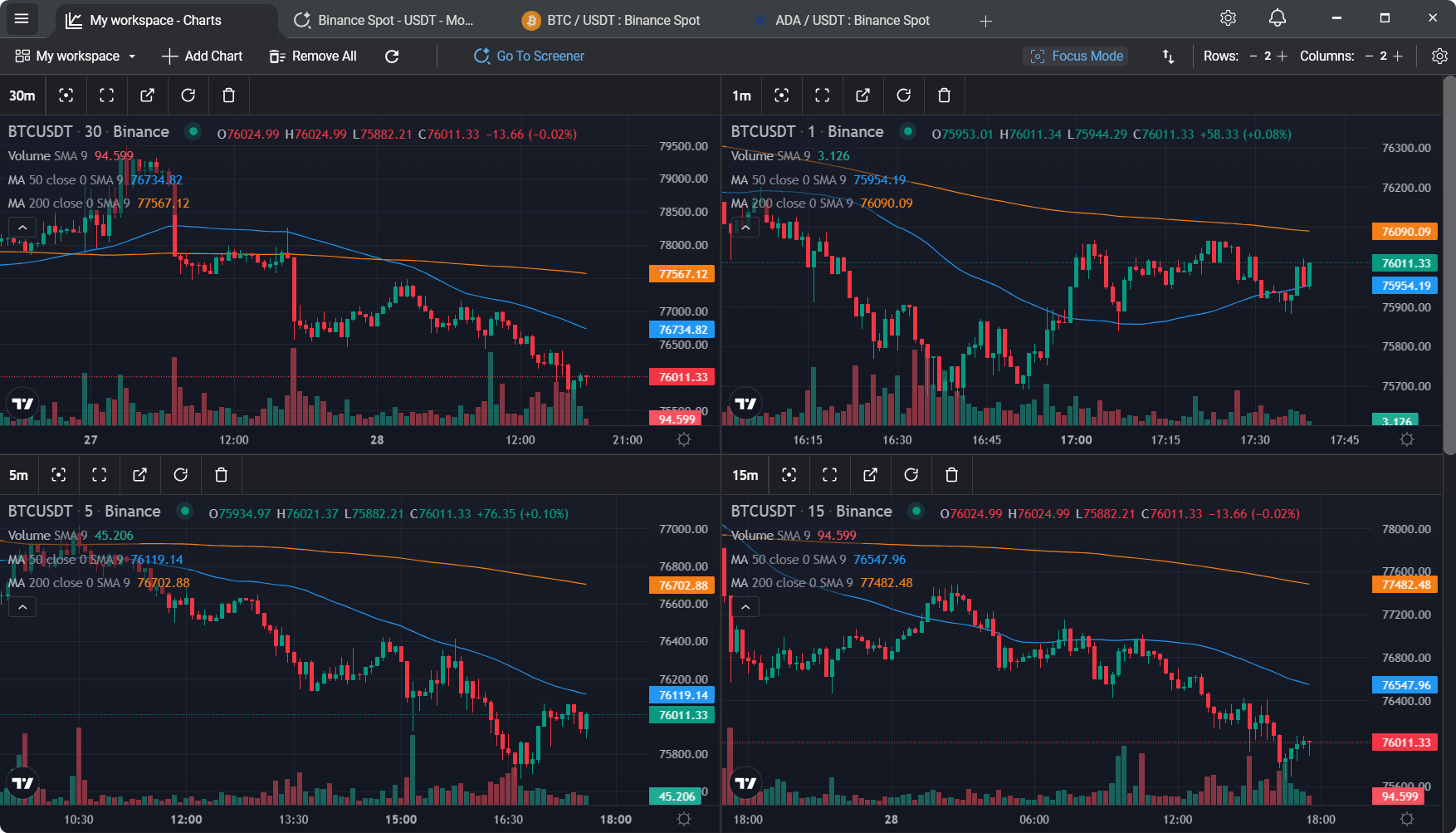
Add as many charts as you want to any workspace, run as many workspaces as you want as separate tabs. Curated presets spin up a BTC multi-timeframe or top-volume view in one click - then adjust freely. No manual layout building every morning, no "upgrade to unlock multi-chart" modals.
Building a multi-chart layout is the least interesting part of trading
Anyone who trades seriously ends up watching more than one chart. BTC on the 15-minute and 1-hour to catch the trend, a couple of alts for rotation, maybe an ETH chart because ETH moves first. It's a sensible workflow.
The problem is setting it up. On most platforms, you drag tiles around, pick pairs, pick timeframes, wire up indicators, save it, name it, and hope you don't accidentally close the layout next time. Then you do the whole thing again when you want a different view. It's half an hour of admin for something that should be a preset.
Unlimited charts per workspace - plus one-click presets
A workspace is just a container. Add as many charts as you like - two, six, fifteen, thirty - in any grid layout (rows × columns). If your layout can't fit everything on screen, the workspace scrolls. No ceiling on chart count, no separate "pro" workspace tier.
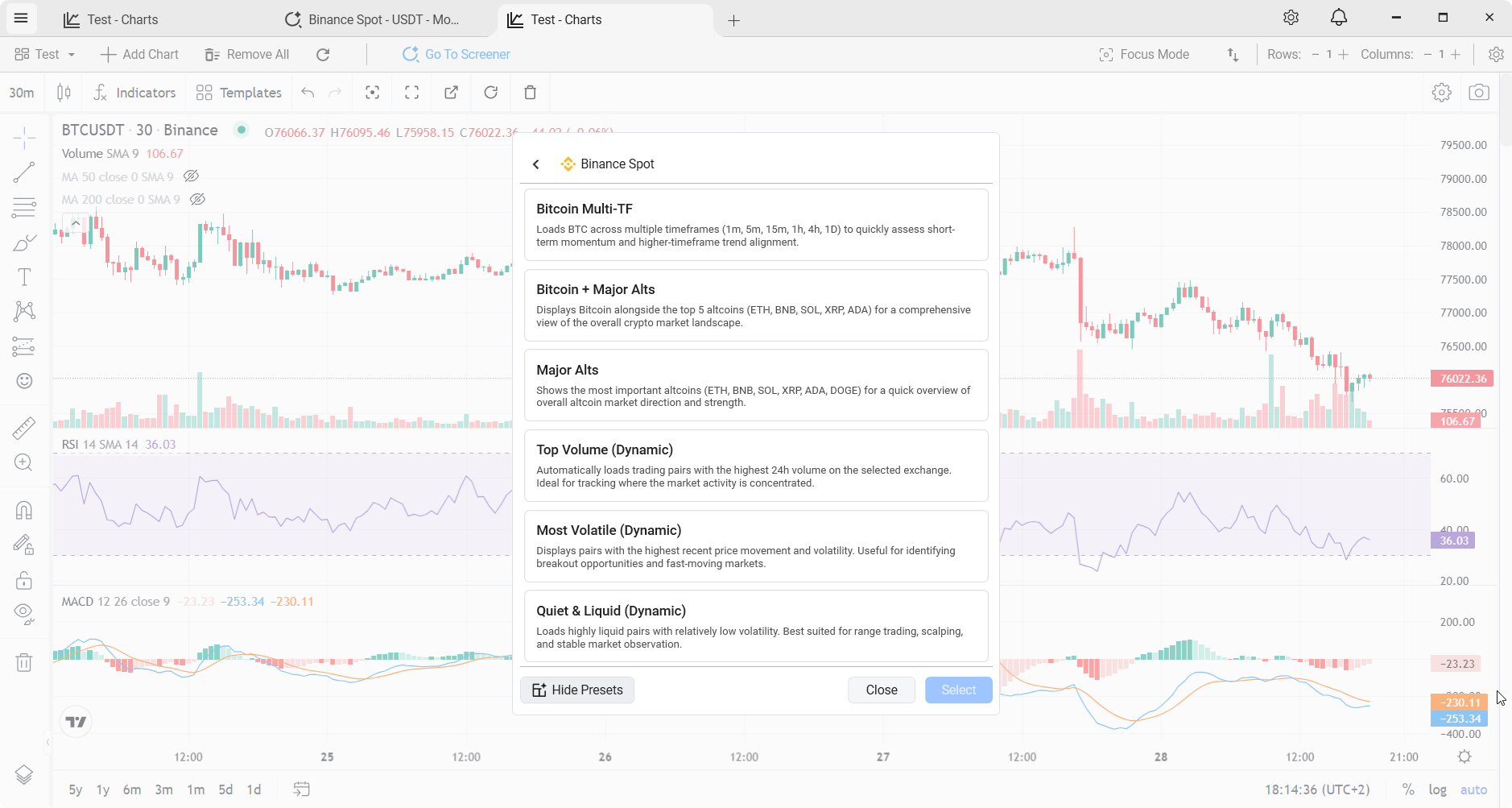
Presets are a convenience, not a constraint. Six curated layouts open instantly from a menu - pre-wired with specific pairs, timeframes, and indicators, so you skip the setup when you want a known view. Three are static (fixed pairs); three rebuild themselves live from market conditions. Once opened, a preset is yours to edit: swap a pair, change an interval, add more charts, remove ones you don't need, stack extra indicators. Nothing stays locked after the click.
The six built-in layouts
Static Fixed-pair layouts
Bitcoin Multi-TF
BTC/USDT on 1m, 5m, 15m, 1h, 4h, and 1D. The classic multi-timeframe trend-alignment view.
Bitcoin + Major Alts
BTC alongside ETH, BNB, SOL, XRP, and ADA. Full market landscape on one screen.
Major Alts
ETH, BNB, SOL, XRP, ADA, DOGE. Quick read on altcoin market direction without BTC in the frame.
Live Dynamic layouts that rebuild themselves
Top Volume
The six highest-24h-volume pairs. Always shows where the market's attention actually is right now, stablecoins excluded.
Most Volatile
Widest 24h range relative to price. Breakout candidates and fast-moving markets, pre-filtered.
Quiet & Liquid
High liquidity, low volatility. The opposite view - calm pairs for scalping and range trading.
Customise freely, persist everything
Presets are a starting point, not a cage. Any layout can be adjusted - swap a pair, change a timeframe, add or remove indicators, resize the tiles. The workspace saves automatically. Close the app, reopen it, and your view is exactly where you left it, drawings and all.
And you're not capped at one. Open unlimited workspaces, each in its own tab, each with its own independent grid layout. Run a BTC multi-timeframe view in tab 1, a dynamic Top Volume layout in tab 2, the market screener in tab 3, and a custom altcoin rotation workspace with a dozen charts in tab 4. Switching between them is instant because nothing gets torn down.
Small touches that actually matter day to day
Focus mode
Toggle a cleaner view that hides the TradingView toolbars across every chart in the layout. Maximum screen real estate for the candles themselves - useful on smaller displays or when you just want the charts.
Drag-and-drop reorder
Reorder charts inside a workspace with a simple drag-and-drop popup. No right-click menus, no "move up / move down" buttons - just pick a chart up and drop it where you want it.
Live market picker
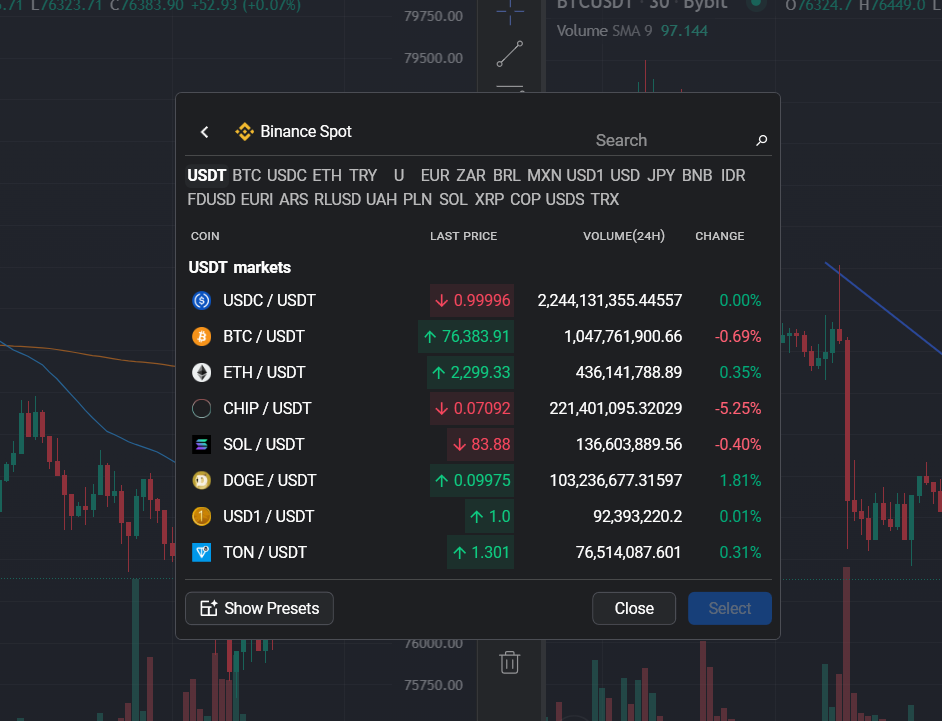
Adding a chart uses a rich popup showing the exchange logo, symbol, live last price with up/down arrow animation, 24h volume, and 24h change %. Search-as-you-type to find pairs fast - the same kind of list the exchanges themselves show.
Feature rundown
- Unlimited charts per workspace. Any grid size (rows × columns), and the workspace scrolls when your layout has more charts than fit on screen. Put two on a tab or thirty, the app doesn't care.
- Unlimited tab-based workspaces. Each tab is its own workspace with its own grid. Run as many as you want.
- Six preset layouts for quick starts. Three static (Bitcoin Multi-TF, BTC + Major Alts, Major Alts), three dynamic (Top Volume, Most Volatile, Quiet & Liquid). Fully editable after you open them.
- Any timeframe, any pair. Charts support 1m to 1D on any pair the exchange offers.
- Full TradingView charting engine per tile. 70+ indicators, drawing tools, crosshair, the lot.
- One WebSocket pipeline for all of it. Running many live charts is cheap - the exchange stream is shared.
- Workspace persistence. Your layout, indicators, and drawings are saved automatically. No "load workspace" dance.
- Focus mode and drag-and-drop reorder. Quality-of-life features that aren't obvious until you want them, then you use them every day.
- No cap, no paid tier. Multi-chart is the default, not a feature behind a subscription.
A few practical questions
"Is there a maximum number of charts per workspace?"
No hard cap. Pick whatever grid layout suits you; if you add more charts than the grid can show on screen, the workspace scrolls. Practical ceiling is whatever your machine's RAM handles comfortably.
"Do I have to start from a preset?"
No - you can open a blank workspace, set a grid size, and add charts one at a time. Presets exist purely for convenience when you want a known view quickly. Build your own workspaces from scratch whenever you prefer.
"Will my machine handle it?"
Probably. 8 GB of RAM handles a busy workspace comfortably; the official minimum is 4 GB for simpler setups. More charts use more memory, but the overhead per chart is small.
"What if I want a completely different combination of pairs?"
Open a preset and edit it - swap pairs, change timeframes, remove charts, add new ones. Or start blank. Presets aren't templates you have to keep pure; they're seed layouts you can morph into whatever workspace actually matches how you trade.
Related
Real-time crypto market screener
Pair the screener with a multi-chart workspace for full market coverage.
Free TradingView alternative
Why multi-chart usually costs $14.95/month on other platforms.
Native crypto charting app
Why a dozen live charts in a browser drain your laptop's battery.
Multi-exchange crypto charts
Layouts work across all seven supported exchanges.
Skip the setup, start reading markets
Download TabChart, pick a preset or start blank, and you're watching live charts in under a minute.
Download TabChart freeWindows 10/11 - free, no account needed