Crypto price alerts
that actually reach you
Watch any market, pick a condition, and get notified five different ways - desktop popup, email, Telegram, webhook, or a local app. Free, native, no account.
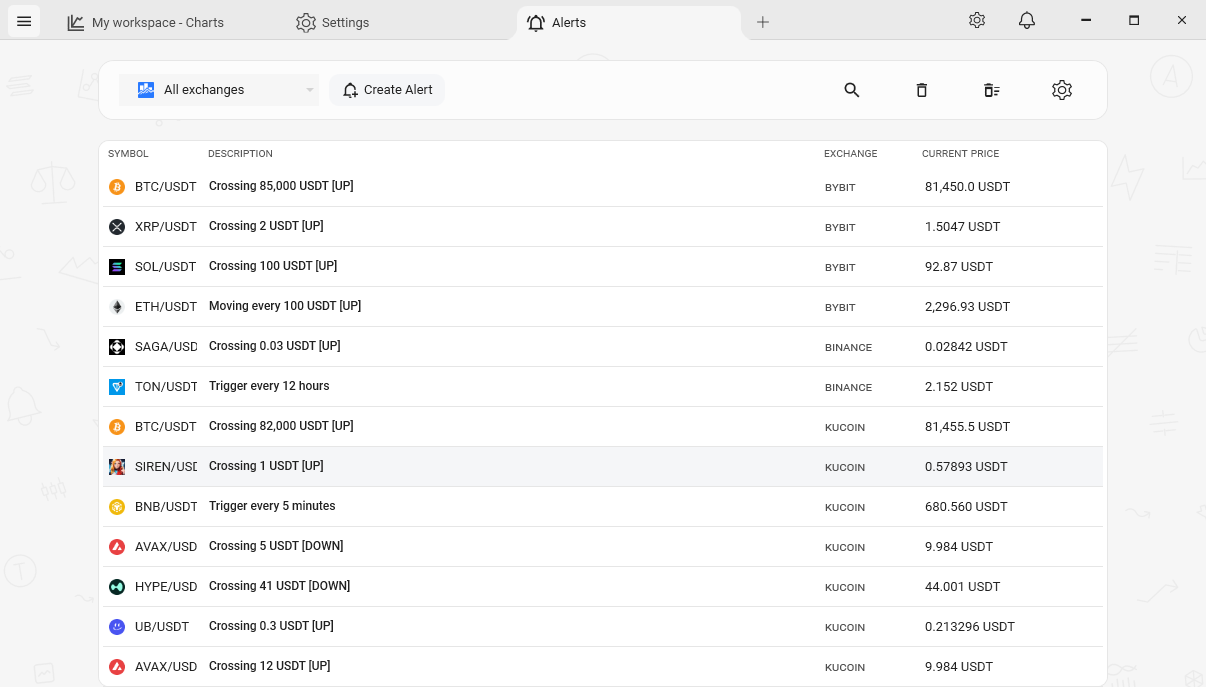
You can't stare at the chart all day
Most of trading is waiting. A level you care about is hours - sometimes days - from being hit. Nobody wants to sit and watch a candle crawl toward it. So you need the chart to tap you on the shoulder when something actually happens, and otherwise leave you alone.
That's what a price alert is for. The catch is where the alert lands. A popup is useless if you've stepped away from the PC. An email is useless if you don't check email. The alert is only as good as the channel it arrives on - and most tools give you one.
Where the usual options fall short
Browser-based charting tools put price alerts behind a paid plan - the free tier gives you one or two, then it's a monthly subscription. Exchange apps have alerts, but only for that one exchange, and the notification is locked to their mobile app. Standalone alert bots usually mean handing over API keys and trusting a third-party service to watch your markets.
And almost all of them pick the delivery channel for you. You get a push notification, or you get an email, and that's the end of the conversation. If you want the alert to also hit a Telegram channel, or kick off a script on your machine, you're out of luck.
TabChart's alerts: one event, five channels
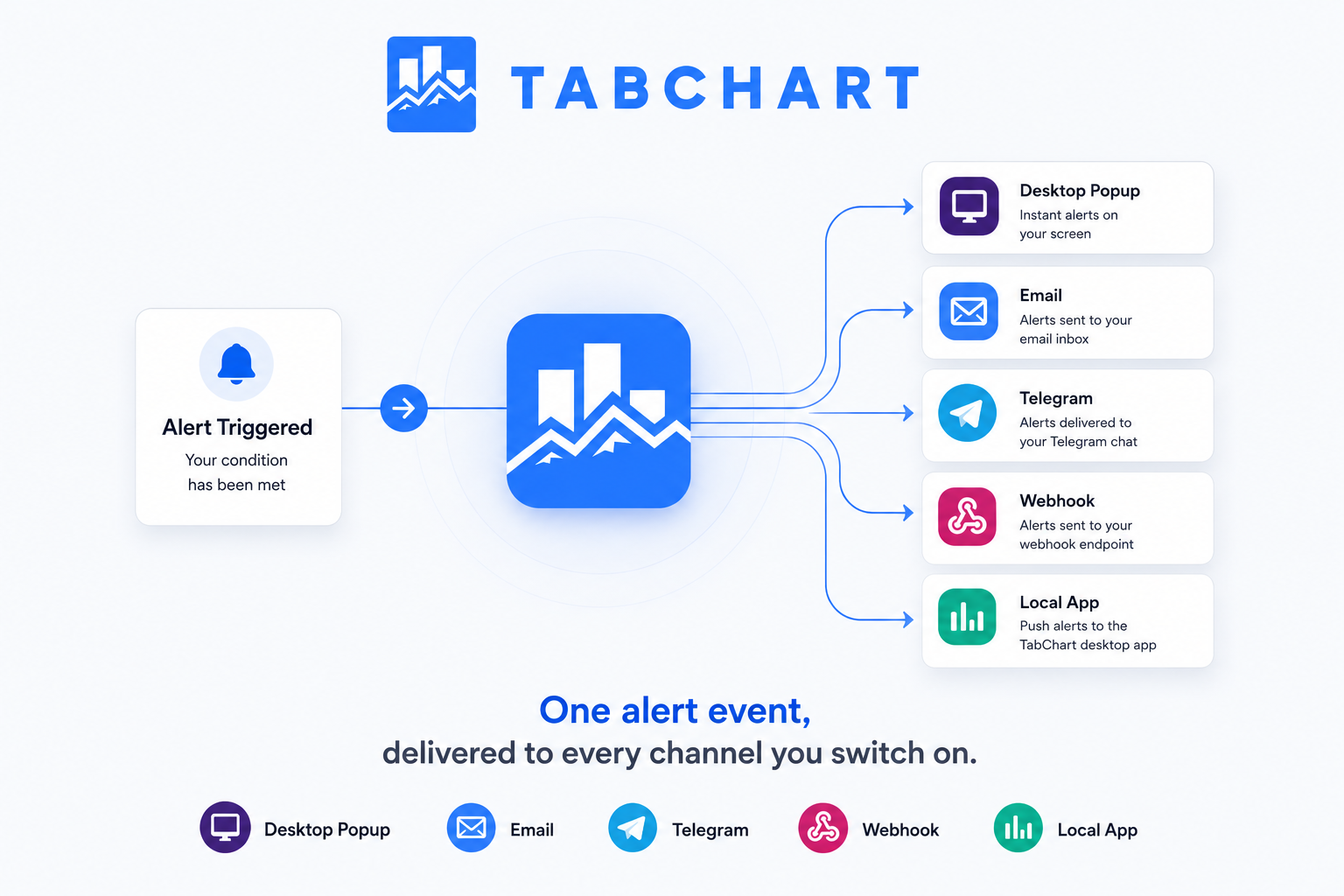
You create an alert from the Alerts page - pick a market, pick a condition - and the app evaluates it on every live ticker update. When it fires, that single event fans out to every channel you've enabled at once. Turn on all five and one trigger reaches you as a desktop popup, an email, a Telegram message, a webhook call, and a local-app launch.
It runs on the same direct WebSocket feeds as the charts and the screener, so there's no separate polling loop and no delay between the price moving and the alert firing. And it's part of the free app - no plan, no per-alert limit, no API keys.
Three alert types, for three different jobs
Crossing
Fires once when price crosses a fixed target in the direction you set. A one-shot alert for "tell me when BTC hits 60k." Reactivate it whenever you want it watching again.
Moving
Fires every time price moves past the next step on a grid - every $1,000, say. Re-arms itself after each trigger, so it keeps marking progress as the market runs.
Time interval
Fires on a fixed schedule - every hour, every day - with the current price. A recurring check-in, no price level required.
Each alert can carry an optional note of your own, and a direction - up, down, or both - so it only fires the way you actually care about.
The five channels, and what each is good for
Desktop popup
An in-app notification, in your language. The obvious choice when you're at the machine - instant, no setup.
A formatted message with the trigger details laid out. Good for a record you can come back to, or for when you're away from the PC but near a phone.
Telegram
A message to a Telegram chat or channel. The one most people actually want - alerts land where you already get pinged, including on mobile.
Webhook
A structured payload - JSON for POST/PUT, query string for GET - with stable, machine-readable fields. Wire alerts into your own bot, dashboard, or automation.
Local app
Launches a program on your machine with the alert details passed as command-line arguments. Run a script, trigger a sound, do whatever you want locally.
Test before you trust it
Every channel has a "Send Test" button that delivers a sample trigger. Confirm the webhook fires and the Telegram message lands before a real alert depends on it.
What the alerts feature does, specifically
- Five notification channels. Desktop popup, email, Telegram, webhook, and local app - every enabled channel fires on a single trigger.
- Three alert types. Crossing (one-shot target), Moving (re-arming grid), and Time interval (recurring schedule).
- Direction control. Each alert fires on up moves, down moves, or both - your choice.
- Optional note per alert. Attach your own message so the notification means something when it arrives.
- Structured webhook payload. Stable, machine-readable keys - JSON body or query string - for clean integration with your own tools.
- Same live data as the charts. Alerts evaluate on the direct WebSocket feed - no separate polling, no added delay.
- Send Test on every channel. Verify delivery with a sample trigger before you rely on a real one.
- Free, no account, no API keys. Part of the app. No per-alert limit, no plan to upgrade to.
A few honest questions
"Do alerts fire when the app is closed?"
No - TabChart is a desktop app, not a cloud service. Alerts are evaluated while the app is running. For most people that's fine: the app stays open all day anyway. If you need server-side alerts that fire with nothing running, a hosted service is the better fit.
"Are these indicator alerts, like 'RSI crosses 70'?"
Not yet - alerts trigger on price: a fixed level, a moving grid step, or a time interval. Indicator-condition alerts aren't part of the feature today. If price-based alerts cover what you need, this does the job; if you specifically need indicator triggers, TradingView is built for that.
"Can one alert really hit all five channels?"
Yes. A trigger produces one event that fans out to every channel you've switched on. Enable one, enable all five - it's per-channel, and they all fire from the same event.
Related
Real-time crypto market screener
Find the market worth setting an alert on in the first place.
Real-time crypto charts on Windows
The same WebSocket pipeline that alerts evaluate on.
Free TradingView alternative
Multi-chart layouts, a screener, and alerts - without a subscription.
TabChart vs TradingView
How the two stack up, alerts included.
Let the chart tap you on the shoulder
Install, pick a market, set an alert - and choose how it reaches you.
Download TabChart freeWindows 10/11 - free, no account needed