A free TradingView alternative
that actually uses the same charts
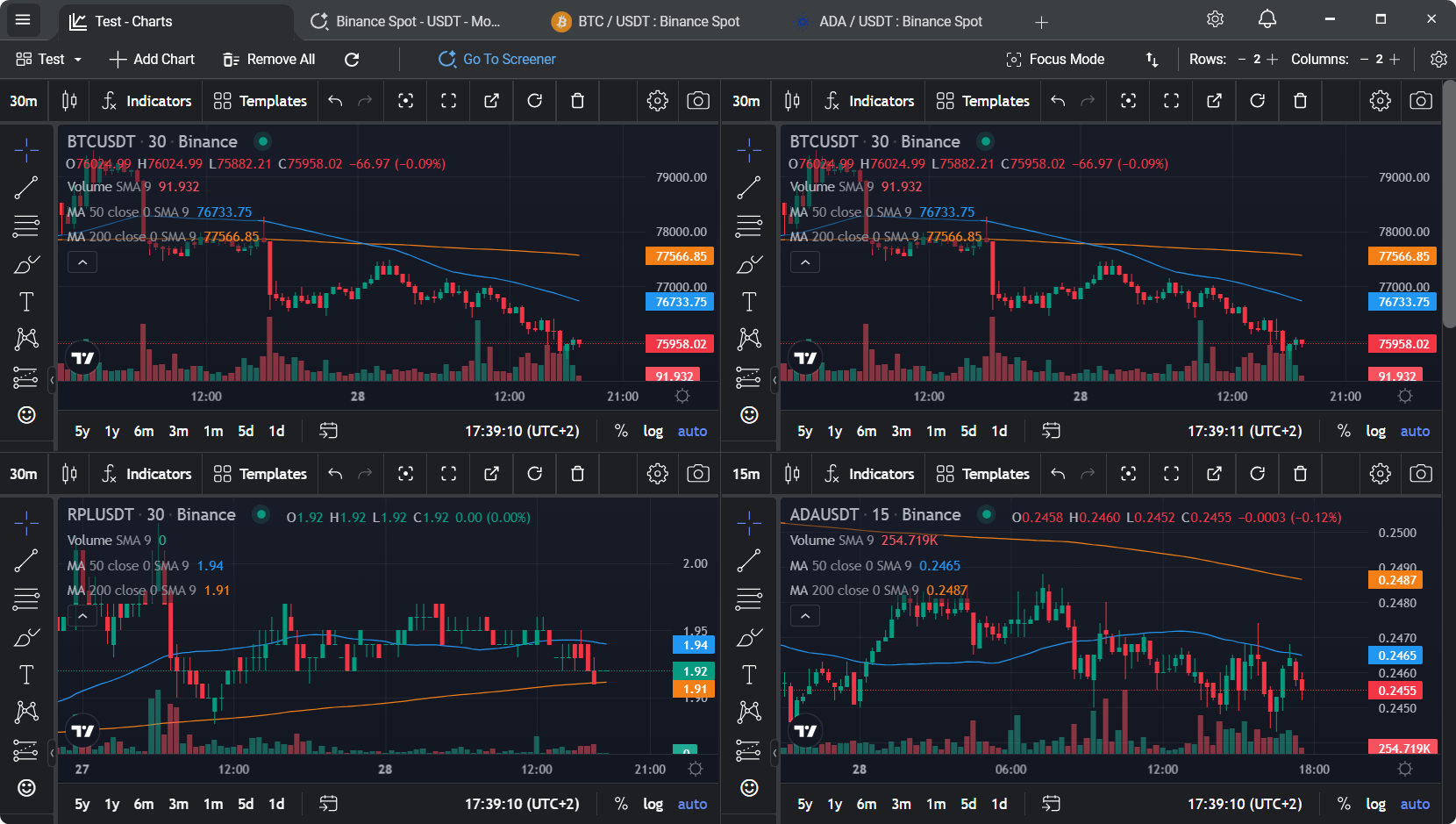
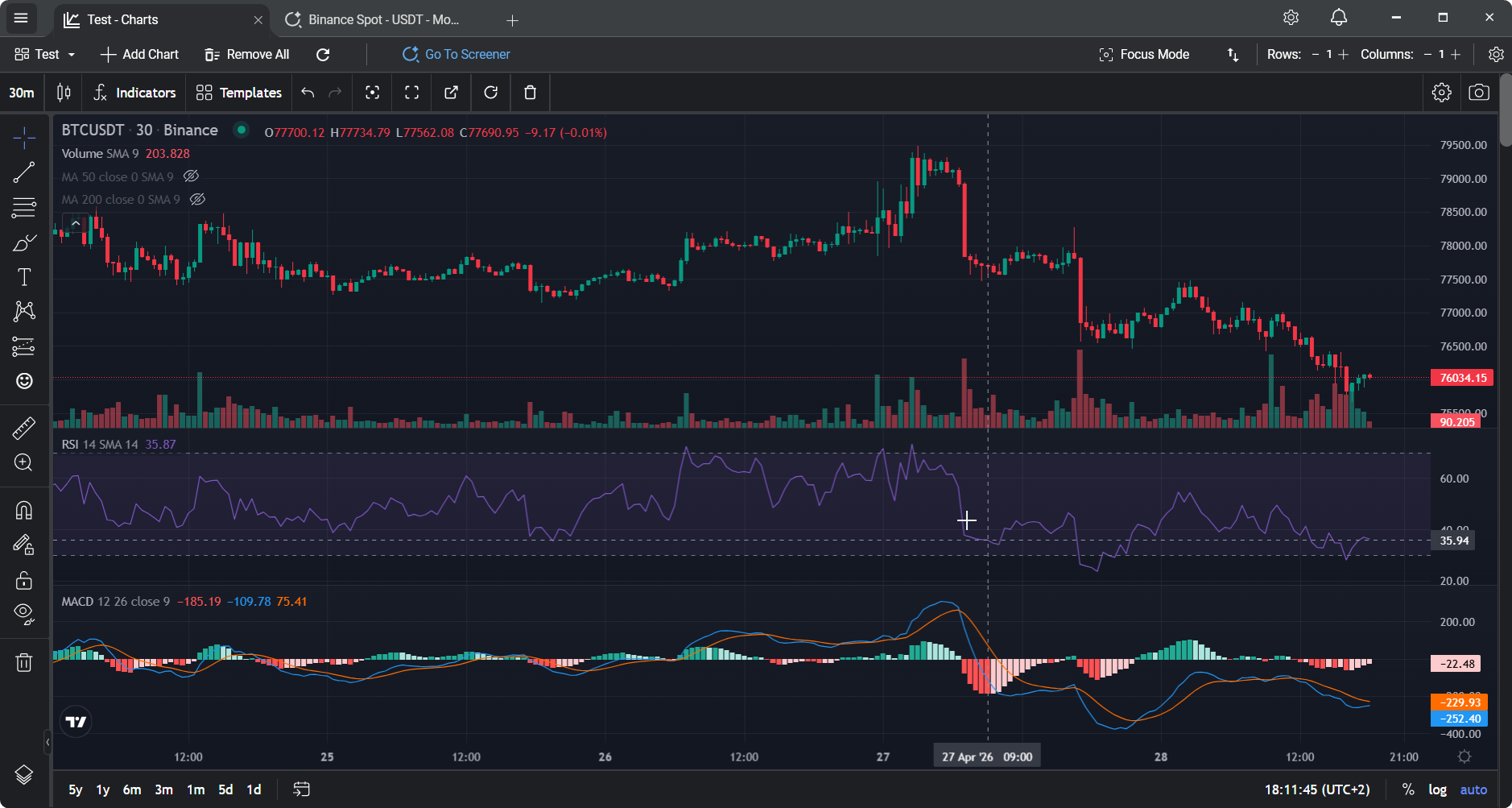
TabChart embeds TradingView's charting library inside a native Windows app. Multi-chart workspaces, 70+ indicators, real-time data - no subscription, no ads, no account.
TradingView is great - until you read the pricing page
TradingView's free tier looks generous on the surface. You get their charting engine, a decent indicator library, and access to almost every market you'd ever want to look at. Then you try to put two charts side by side, and you hit the wall. One chart per layout on the free plan. Watermarks on screenshots. Ads in the sidebar. A limit on how many indicators you can stack on a single chart.
Multi-chart layouts - the thing most traders actually want - start at $14.95/month on the Essential plan. Want more indicators per chart, alerts, and a few screens saved? That's higher up the ladder. For a tool most traders use to watch crypto for a few hours a day, it adds up fast.
The usual "free alternatives" fall short
Most free TradingView alternatives fall into one of two camps. Either they're built on a different charting engine that looks clearly cheaper - crude candles, limited indicators, awkward drawing tools - or they're websites with free tiers that are even more aggressively capped than TradingView itself.
What's actually missing is something in between: a dedicated app that gives you the real TradingView charting experience without the subscription, without the browser, and without shipping your chart data through a third-party server.
TabChart uses TradingView's charting library directly
This is the part most people don't realise. TabChart embeds TradingView's charting library inside a native Windows app. The candles, the crosshair, the indicators, the drawing tools - they're the real thing. It's the same engine millions of traders already know, just delivered in a different container.
What's different is everything around the chart. No login wall, no watermark on exports, no sidebar ads, no plan comparison modal when you try to open a second chart. The app runs as a standalone WPF process, so it doesn't fight your browser for memory, and it stays smooth over long sessions.
What you get for free in TabChart
Unlimited multi-chart layouts
Unlimited charts per workspace, unlimited workspaces as tabs. No cap, no tier gating, no "upgrade to unlock" pop-ups.
70+ technical indicators
The full indicator set from TradingView's library - moving averages, RSI, MACD, Bollinger Bands, VWAP, volume profile, and the rest. Stack as many as you want per chart.
Built-in market screener
Nine curated presets - Top Volume, Most Volatile, Quiet & Liquid, Near 24h High/Low, and more - all updating live via WebSocket data. TradingView's crypto screener is behind a paid tier.
Real-time exchange data
Direct WebSocket connections to Binance, Bybit, Kraken, KuCoin, OKX, HTX, and Poloniex. No data provider between you and the exchange.
No ads, no watermarks
Clean interface, clean chart exports. The screenshot you take is the screenshot you get.
No account required
Install, pick an exchange, start charting. No sign-up, no email verification, no profile to manage.
Default indicator presets - unique to TabChart
Set your favourite indicator stack once in Settings, and every new chart opens with it applied. Plus drawings and chart styling persist across sessions. Not a feature TradingView offers at any price.
Configure your indicators once, apply them everywhere
Here's one thing TabChart does that TradingView itself doesn't, free or paid. Build the indicator stack you actually trade with - say, a couple of moving averages, an RSI, a VWAP - on any chart. Hit the TradingView save-preset button. Then go to Settings → Charts → Default Templates and pick it as your default.
From then on, every new chart you open - whether it's a fresh pair, a tile in a multi-chart workspace, or a chart detached from a multi-chart layout - starts with your indicator stack already applied. No re-adding the same five indicators every time you open a new pair. No "save as template, then manually apply" dance on each chart.
Drawings and chart styling persist across sessions too. Close the app, reopen it, your levels, trendlines, and Fib retracements are exactly where you left them.
See it in action
This is a multi-chart workspace opening one of the BTC preset layouts in a single click - the kind of view you'd need a paid TradingView plan for. Workspaces themselves have no chart cap; the preset just fills one with six to start.
Honest objections, honest answers
"What's the catch? Why would someone give this away?"
No catch, but here's the context: TabChart only connects to public exchange APIs. There's no server cost for me to pass on to you, no per-user data feed to pay for, no cloud storage to keep running. If you paid for it, you'd be paying for overhead that doesn't exist.
"Is this really the same TradingView charts?"
Yes. The charting library is licensed and embedded inside the app. It's the same rendering, the same indicator implementations, the same behaviour. What's missing is TradingView's platform - Pine Script, the community feed, cross-asset coverage, alerts. If you need those, TradingView itself is the right choice.
"Does it work on Mac or Linux?"
Not yet - TabChart is Windows-only (Windows 10/11, 64-bit installer). If you're on Mac or Linux, TradingView's web app remains the realistic option.
"Can I keep using TradingView alongside it?"
Plenty of people do. TradingView for research, community scripts, and cross-market charts; TabChart as the daily crypto charting workspace that doesn't cost $180/year.
Related
Multi-chart crypto setup
The feature this page is really about - unlimited multi-chart workspaces.
Real-time crypto market screener
The other TradingView feature that's free here and paid there.
TabChart vs TradingView
Full head-to-head comparison - where each tool wins.
Native crypto charting app
Why running charts outside the browser matters all day long.
Give it an afternoon
Download, pick an exchange, open a multi-chart workspace. If it doesn't feel like TradingView - it's already installed, uninstall takes a click.
Download TabChart freeWindows 10/11 - free, no account needed